

Halloo Enhanced Business Communications(SM) Home    Bookmark this page    Email this site to a friend    Talk to Halloo
Build Your Own Halloo! · Sign-In
( Features Virtual Office FlexCall Center Partners Community Support )
 

How do I check my messages over the phone?

To hear your voice messages on your telephone, dial your own Halloo telephone number to access your extension.
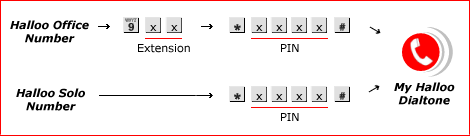
During the outgoing message prompt, press * (star) to halt the greeting. Then enter your secret passcode (PIN) followed by # (pound).

Follow the prompts from there to navigate the My Halloo Dialtone interface. To hear your voicemail messages, press ‘*1’.

Note: You can skip the PIN entry process by doing the followng:

  1. Sign into My Halloo Web.
  2. Click the User Settings tab of your extension
  3. Click the Forwarding subtab.
  4. Check the Connect to Halloo Dialtone when I call in option
  5. Click the [Save Changes] button to save your changes.
 
BBBOnLine Reliability Program About Us  · Partner Login  · Site Map  · Privacy Policy  · About this Site  · Terms of Service

Copyright © 2003–2008, Halloo Communications, Inc. All rights reserved.