

Halloo
24x7 Customer Service: (888) 238-3822   ·   Blog   ·   Support   ·   Sign-In
 Features
 Virtual Office
 FlexCall Center
 Customer Success
 Community
 Pricing
  Sign-Up
Simple. Reliable. Affordable. Halloo has the fastest customer service on the Internet. Any time I've e-mailed an inquiry, request or problem, they have responded almost immediately.
 

Can I forward voicemail to my current email address?

Yes! Voice messages may be accessed online via the My Halloo website, or forwarded to an existing email address. This gives you the convenience of a unified inbox, and the ability to forward, save and manage your messages on your PC.
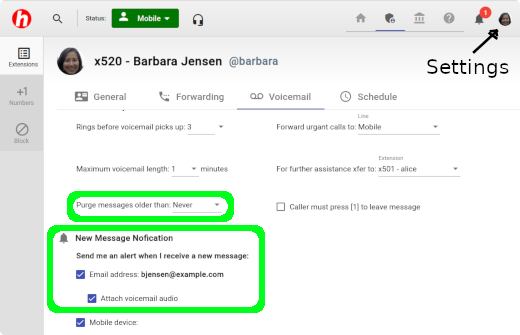
  1. In the User Settings tab of the My Halloo website, select the Voicemail subtab.
  2. Locate the heading New Message Notification.
  3. Check the Email address and Attach voicemail audio boxes to forward your voice messages to an existing email box.
  4. Click the [Save Changes] button to save your changes.

NOTE: When your system is set to forward voicemail to your email address, it will continue to retain emails in your online Halloo account until you specifically request that they be deleted. This is to prevent loss of critical emails in case of unexpected email connectivity delays or problems. In order to avoid incurring excess audio storage fees, you will want to delete the messages from your Halloo system periodically, even if you are primarily managing your voicemails from your email inbox.

 
BBBOnLine Reliability Program About Us  · Site Map  · Privacy Policy  · About this Site  · Terms of Service

Copyright © 2003–2012, Halloo Communications, Inc. All rights reserved.

Facebook

More Research on Small Business Communications

What is a Hosted PBX? | Best Startup Phone System | Enhanced Small Business Voicemail | Lookup Available Toll Free Numbers | Virtual Call Center Software | Live Answering Service On Demand