
|
|
|
| Build Your Own Halloo! · Sign-In |
| Features | Virtual Office | FlexCall Center | Partners | Community | Support |
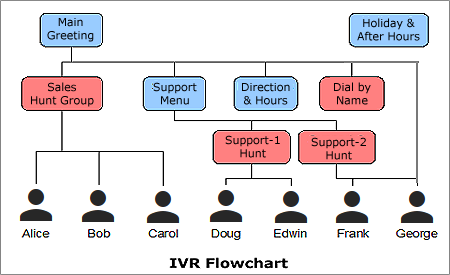
What is a Hunt Group?A hunt group allows a caller to automatically find an available
(i.e. “not busy”) agent from amongst a group of extensions. Each
extension will be tried in order until a “free” extension
is reached. Extensions will be skipped if the person is currently on
the phone or has marked their extension as “blocked” from
hunting. (See the Quick Reference Guide section of
the Support pages for details about blocking calls from hunt groups).
Hunt groups may be searched sequentially or round robin style. A sequential hunt always starts with the first extension in the list, and works down. Round robin distributes the calls evenly amongst the members of the group by rotating the group member whose extension is tried first, then searching down the list in sequential order. Adding a hunt groupCreate a hunt group within an auto attendant by adding a New Special Menu and selecting Hunt Group type:
Configuring hunt group extensionsExpand the new hunt group menu by clicking on its name in the menu list. For example:
Add user extensions to the group, set a default extension and set the hunt order here. If no users are available, the caller will reach the voicemail box of the extension set in the “Voice mail if no one available” field. If you choose to omit this setting, callers will be directed to the voicemail box of the last user extension in the Hunt Group sequence. The voicemail extension can also be a member of the hunt group. Used in this way, the system will try the hunt members in the programmed order and return to the voicemail extension only if no one is available. In the example above, Bert is the first agent in the hunt group, so new calls will be routed to him first. If he is busy, calls will overflow to Maryanne, then Jane. If each of these users is busy or unavailable, calls will be routed directly to Alice's voicemail box. Please Note:Hunt groups are only useful if you have at least 1 user extension designated, in addition to the Default extension. (If you choose to omit the Default extension, you will need at least 2 user extensions.) With only a single user extension and no distinct Default extension, the hunt group serves no purpose not already met by the user's individual Forwarding preferences. Special Case:If you would like to use a hunt group to “follow” a single user to multiple locations, you may. To accomplish this, you will need a different user extension set up for each of your possible locations. Set up a hunt group with these distinct extensions in the order you would like the system to hunt for you. Enter your main voice mailbox as the Default extension. |
|
|
About Us ·
Partner Login ·
Site Map ·
Privacy Policy ·
About this Site ·
Terms of Service
Copyright © 2003–2009, Halloo Communications, Inc. All rights reserved. |