
Halloo
24x7 Customer Service: (888) 238-3822   ·   Blog   ·   Support   ·   Sign-In
 Features
 Virtual Office
 FlexCall Center
 Customer Success
 Community
 Pricing
  Sign-Up
Simple. Reliable. Affordable. Halloo has the fastest customer service on the Internet. Any time I've e-mailed an inquiry, request or problem, they have responded almost immediately.
 

How do I set up after hours greetings?

Each Auto Attendant is capable of recognizing special rules scheduled call routing. Any administrator can create or revise these Advanced Rules by logging into the My Halloo website.

Important! Before an Advanced rule can redirect calls to a special “After Hours” greeting, you must first add a new menu to your Auto Attendant. Refer to the How to configure questions on this section of the Support page.

Click the All Extensions link at the top of the screen. Then, select the extension of the Auto Attendant you wish to modify (for most plans that would be extension ‘00’ / main).

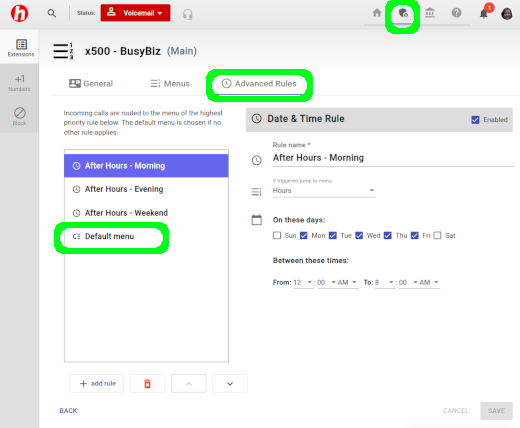
Select the Advanced Rules tab on the left side of the screen, and click [New Time Rule] to add a time based rule to your attendant. Advanced rules are tested as calls enter the system to determine which menu should be played first. If no rules match the chosen criteria, the default menu will be played. Enter your call routing preferences into the Advanced rule, check the ‘Yes’ box to activate the rule, then click the [Update] button to save your changes.

Below is a common way to set up an After Hours Greeting for your main office:

  1. Add time-based rules to direct callers to an after-hours announcement menu. Start by adding an after hours menu in the Auto Attendant section. This menu should look something like:
  2. Message: “Thank you for calling Busybiz company. We are currently closed. Our hours of operation are 9am to 5pm, Monday through Friday. To leave a message, please press 1.”
    • Event: keypress 1, xfer to ext. 99 (general voicemail)
    • Event: keypress 9, jump to dial by extension directory
    • Event: timeout 3 secs, xfer to ext. 99 (general voicemail)
  3. Then, add time rules to direct callers to this menu. First, add a weekend rule titled weekends, for all day, Saturday and Sunday.
  4. Next, add a weekday morning rule: 12am through 9am, Monday through Friday.
  5. Finally, add a weekday evening rule: 5pm to midnight, Monday through Friday.
 
BBBOnLine Reliability Program About Us  · Site Map  · Privacy Policy  · About this Site  · Terms of Service

Copyright © 2003–2012, Halloo Communications, Inc. All rights reserved.

Facebook

More Research on Small Business Communications

What is a Hosted PBX? | Best Startup Phone System | Enhanced Small Business Voicemail | Lookup Available Toll Free Numbers | Virtual Call Center Software | Live Answering Service On Demand