

Auto attendants may be added to your system if you wish to establish independent sets of menus and greetings for your callers. For example, you may wish to establish a new phone number for special promotions or perhaps as a support line for your preferred customers. You must subscribe to an additional DID (direct inward dial) number for this feature to be enabled.
To add a new auto attendant, click the All Extensions link at the top of the My Halloo website. Then, click the [New Attendant...] button. Supply the required information as shown in the example below:
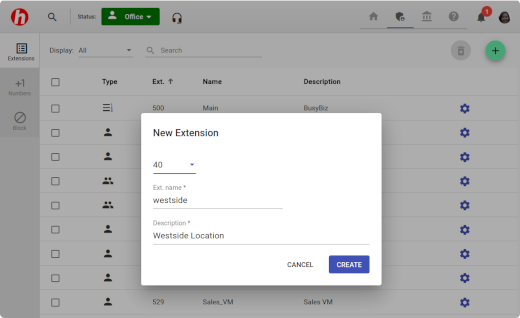
The AA Name is a short, unique name for the new extension. It must start with a letter, and may contain only letters [a-z,A-Z], numbers [0-9] and the '.' (period), '_' (underscore), and '-' (dash) characters.
The Description is a longer name which describes the main function of that Auto Attendant. This is also a required field.
The Extension is a 2-digit number (00-99), unique to your account. Larger plans may use 3- or 4-digit extensions.
After you create the new Auto Attendant, you will need to request an additional toll-free number to be assigned to the extension. Please contact Halloo Customer Care for assistance.
To configure the Auto Attendant menus and keypress events, please refer to the Auto Attendant section.